
Case Study Throughout · "Midnight Lost and Found"
Lin, a night-shift lost-and-found clerk, discovers a brass key connected to her father's disappearance. Her partner Wei knows the clue but refuses to speak because of a promise. Before the station closes at midnight, Lin must decide whether to trust him.
The example consistently uses a realistic style, two main characters, and one station. The plot and shots in the text are teaching examples; the screenshots come from the actual English interface and show inputs and settings, not generated quality samples.
How are AI short dramas and animated dramas produced? Set up a creative workflow from scratch
If you try to pack a complete story, character settings, visual language, and special effects requirements into one prompt, the model will struggle to satisfy all constraints at once. The value of advancing in stages is that mistakes can be discovered where the cost is lower.
Fix the story before fixing the shots; confirm the reference images before investing in video generation.
- 1
Define the minimum creative brief
Clearly write the protagonist, goal, obstacles, stakes, and ending direction, then determine genre, content language, aspect ratio, and number of episodes. If you already have a novel, add the must-keep events and the allowed scope of adaptation.
- 2
Leave a clear deliverable for each step
The outline delivers episodic causality, the body text delivers actual events, the script delivers filmable action, assets deliver references, and the storyboard delivers the shot plan. Do not let the next step guess what the previous stage failed to decide.
- 3
Validate with one complete small scene
It is recommended to first make a short scene that includes establishing space, character reactions, and action handoff. Compared with a single beautiful image, it is better at exposing character drift, spatial errors, and editing breaks.
| Project type | Priority problem to solve | Best first step |
|---|---|---|
| Continuous AI Short Drama / AI Animated Drama | Episodic causality, character relationships, and stability of characters and voices across episodes. | First complete one two-person dialogue scene to validate the full workflow. |
| Vertical short video / Shorts / Reels | Whether the opening is immediately understandable, a single information point, and mobile framing plus subtitles. | First make one complete event, then test different openings. |
| AI Cinematic Short Film | Performance, space, shot rhythm, sound, and visual style. | First make a storyboard previs, then generate final assets after confirming the edit. |
On narrow screens, scroll left and right to view the full table
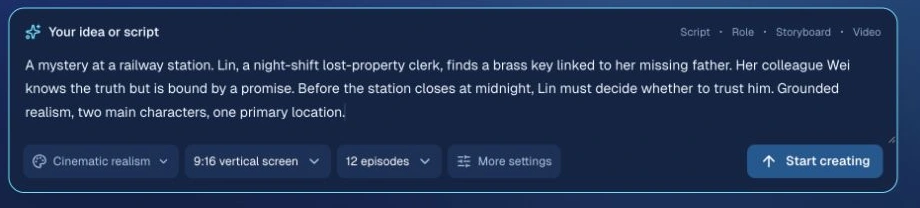
MakiVue's current approach
The project organizes the outline, body text, script, character and scene assets, storyboards, and final cut within one creative workflow, supporting staged editing and partial regeneration.
Methods that can be used further
Save a creation record for each key confirmation point: what changed, why it changed, and which downstream assets it affects. In collaborative work, assign one approver for each stage to avoid different people changing the same setting at the same time.
Before moving to the next stepWithout reading a long setting document, you should still be able to explain in two sentences what the protagonist wants to do and the cost of failure.
AI Outline Generation: Make Every Episode Have a Goal, a Choice, and a Result
An outline is not just dividing the same suspense into many segments. Every episode should change the character's situation: what they learned, what they lost, and what choice they made that cannot easily be undone.
Each episode should deliver at least one partial result, then leave a new question caused by the actions in that episode.
- 1
Determine the ending first, then place the clues
First write the core truth clearly and the final change in character relationships, then arrange where clues appear, where they are misread, and where they are corrected. Suspense can hide information, but the later answer must not overturn facts that have already been established.
- 2
Write five fields for each episode
Opening state → episode goal → obstacles and choice → actual result → ending state. Give the audience an understandable question as early as possible in the opening, for example, Lin recognizes the engraved number on the key; the ending suspense must be caused by the episode's choice, not created by simply cutting off right before the answer.
- 3
Check the intensity curve of the whole arc
After tension, there should be space to process information and character reactions. If several episodes in a row rely on misunderstandings, interruptions, or suddenly appearing characters to create reversals, the audience's trust in the story will be worn down.
| Beat | Character action | Result and next step |
|---|---|---|
| Discovery | Lin finds the engraved number C17 on the lost-and-found key. | The clue becomes specific; she realizes Wei recognizes this key. |
| Choice | Lin confronts Wei with the shift handover record, and Wei admits he kept an item for her father. | Wei reveals the storage location; the two decide to verify it together before the station closes. |
| Payoff | Lin opens the storage locker and reads the letter and records left by her father. | The earlier engraved number and concealment are explained, and the character relationship changes because of the truth. |
On narrow screens, scroll left and right to view the full table
Please generate the episodic outline first, without writing the body text.
Keep the confirmed world rules, character motivations, and must-keep events.
For each episode, output: opening state, episode goal, obstacles, character choice, actual result, ending state, foreshadowing and payoff.
Check episode by episode: Does this episode's result lead to the next episode's action? Does any character know information they have not yet learned? Does it repeat the previous episode's conflict?
List the questions that need my confirmation, and do not add coincidences to cover logical gaps.
MakiVue's current approach
The outline workflow includes episodic state planning and full-series integration, checking main plot progression, conflict escalation, foreshadowing payoff, information release, relationship development, and differences between episodes, then revising based on the issues found.
Methods that can be used further
Create a "foreshadowing-payoff" table: for each clue, record its first appearance, who knows it, when it is verified, and when it is resolved. For complex stories, you can first check the boundaries of each character's knowledge, then check the rhythm of suspense.
Before moving to the next stepTwo adjacent episodes should be connectable with: "Because the previous episode happened... this episode must..."
Turning a Novel into Video: From AI Prose to a Shootable Short Drama Script
The key to turning a novel into video is converting narration into events that can be seen and heard. First distinguish the goal: video content based on novel promotion can organize visuals around voiceover, while story-based short dramas require character actions, dialogue, and reactions. If you directly feed long passages of psychological description into a video model, you will usually get only a generalized expression.
Keep the events, causality, and information order, and translate emotion into behavior with clear triggers.
- 1
Continue the prose based on the facts that have already happened
First confirm the actual ending written in the previous episode, then generate the next one. Planned material in the outline does not equal events that have already happened; content that was deleted or rewritten also cannot continue to serve as the basis for subsequent plot developments.
- 2
When adapting, break it into scenes first, then write the performance
Organize the prose by time, place, characters present, and the goal of each scene. Expand “she was very angry” into triggering information, pauses, actions, and responses; dialogue should have a target and a purpose, and avoid having everyone take turns explaining the background.
- 3
Read it once, then time it
Read the dialogue aloud in practice, and count pauses, breathing, actions, and reactions as well. If it runs too long, cut repeated information first, then split the storyboard; do not rely only on speeding up the voice to cram long dialogue into a short shot.
Lin was shocked and also very angry. She felt that Wei had been deceiving her all along.
Wei said, “I’ve seen that key.” Lin stopped sorting the lost items, lowered her gaze to the key in her right hand, then looked back up at Wei: “Why are you only saying this now?”
Adapt the confirmed prose below into a short drama script.
First extract: events that must be preserved, what each character already knows, dialogue turns, time and place, and the ending state.
Output by scene: setting, characters, objective, visible actions, dialogue, and reactions. Prioritize converting inner thoughts into performance with clear triggers.
The target final runtime is [fill in]; leave time for dialogue, pauses, and actions. If it runs over, indicate which parts need to be cut or split into separate scenes.
Finally, provide a correspondence table between the source events and the script scenes; do not add facts not present in the original text just to create twists.
MakiVue's current approach
Prose generation uses prior context and actual fact records; both prose and scripts will go through narrative checks. Script adaptation first does scene planning, then checks source facts, character scope, cross-episode continuity, and shootability; issues will enter the revision workflow.
Methods that can be used further
Create a concise “adaptation comparison table”: source event, script scene, retained information, and narration that may be omitted. When converting important inner activity into performance or scene clues, confirm separately that it does not change the character’s motivation.
Before moving to the next stepFor every important line of dialogue, it should be clear “who says it to whom, and why it is said at this moment,” and every reaction should have a trigger that happened first.
How do you maintain AI character consistency? Start by making solid character reference images
A stable character is not just the same face. Sense of age, outline, hairstyle, and body proportions help identify the person; wet or damaged clothing, injuries, handheld props, and emotions belong to the character’s current state within the story. If these two kinds of information are written together, the character is likely to reset between shots.
Identity references should remain stable; temporary states should update with the story.
- 1
Start by writing recognizable traits
Use specific age, face shape, hairstyle, physique, clothing silhouette, and material instead of “stunning,” “delicate,” or “full of presence.” Main and supporting characters should have distinguishable differences; do not merely change the name.
- 2
Prepare character design images and the necessary three-view references
First choose one clear face image and one full-body image with clear clothing and body shape, then add front, side, or back references as needed for the shots. For character three-view references, check whether the face shape, hairstyle, clothing, and proportions are consistent; a neutral background helps reduce interference from reference lighting and color. Provide clear single images or multiple images according to the model requirements; do not treat tiny faces inside a collage as reliable identity references.
- 3
Record changes once you enter a scene
For example, “Lin’s coat right sleeve is wet, and the key is in her right hand.” Later shots inherit the current changes; costume changes, injuries, or putting down props must have a story basis, and cannot revert to the initial state just because the reference image is from earlier.
| Identity layer: stable over the long term | State layer: changes with the story |
|---|---|
| Lin, 28 years old, short black hair, oval face. | Has just heard Wei’s answer; her gaze shifts from the key to Wei. |
| Olive-green work jacket, off-white shirt, dark trousers. | In this scene, the right sleeve is wet, and a brass key is continuously held in the right hand. |
| Body shape and facial proportions, signature hairstyle. | Current position, posture, injuries, current handheld items, and clothing state. |
On narrow screens, scroll left and right to view the full table
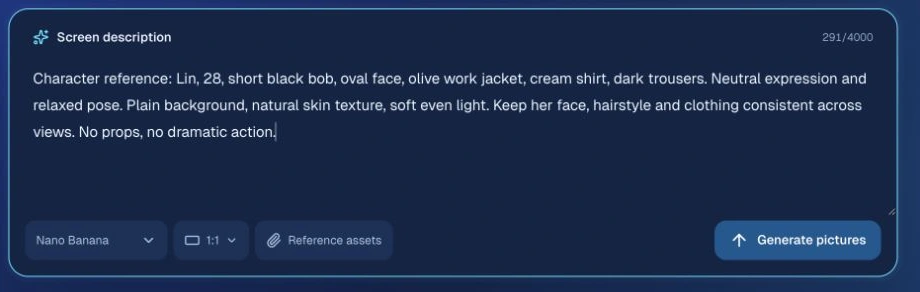
MakiVue's current approach
The character reference workflow includes identity and visual style constraints, candidate reference selection, and quality checks; storyboard frame prompts will distinguish between character identity references and the clothing and state provided by the current shot and the previous shot.
Methods that can be used further
Create clear versions for key costume changes, such as “Lin / night shift uniform / right sleeve wet.” After the identity image is confirmed, adjust camera angles and expressions around that reference; do not redraw a face for every shot based only on the same text. Fixing the seed can be used for controlled experiments in some tools, but it cannot replace identity references.
Before moving to the next stepEven with the name hidden, the character is still recognizable; within the same scene, the hairstyle, clothing, and handheld items have clear and consistent sources.
AI Scene Generation: Locking down space, light sources, and character positions
If you only write “cinematic station,” different shots may generate different buildings. Scene references need to define the function of the space, fixed objects, entrances and exits, and light sources, so that characters can actually act within the same location.
Location identity and spatial relationships take priority over decorative style words.
- 1
Establish spatial anchors first
For example, the service window on the north side, the red door on the west side, the bench on the east side, and the round clock on the wall. When establishing a wide shot, explain their relative positions; close shots may crop out the anchors, but they cannot swap places arbitrarily.
- 2
Separate location from time-based state
“Station lost and found” is the location; “midnight, cool overhead lighting, dim outside the window” is the state of this scene. If the same location shifts from daytime to nighttime, the structure should continue, while the lighting may change for a reason.
- 3
Let style references handle only their own job
A style image determines the rendering method, materials, and overall visual language; a location image determines the layout. Do not turn the station into a neon alley just because the style image contains a neon street.
An upscale, cinematic, mysterious station with stunning lighting and shadows.
The station lost and found at midnight: the north wall has the service window, there is a red door on the west side, a wooden bench runs along the east wall, and a round clock is fixed above the service window. Cool overhead lighting illuminates the counter, and the entrance, exit, and passageways are clear. No people.
MakiVue's current approach
Scene reference prompts prioritize preserving the function, scale, layout, and fixed anchors of the named location; they distinguish style references from location references, and describe usable areas and passage relationships for large scenes.
Methods that can be used further
When errors keep happening with multiple people in the same frame, first draw a simple blocking diagram marking who is closer to the camera, the height difference between characters, and the positions of the counter and door, then generate a composition reference. Long moving shots across multiple locations can be produced in segments; for each segment, reconfirm the space and the handoff, to avoid turning several location images into a meaningless gradient.
Before moving to the next stepYou should be able to point out where a character enters from, where they are walking to, and which side of the background should be visible in a reverse shot.
From Script to Storyboard: How to write shot scripts and AI storyboard prompts
A storyboard converts the script into viewing order. Shot size, camera position, and duration should serve information and performance, rather than mechanically rotating among wide shot, medium shot, and close-up.
Write the purpose and the start and end of the action first, then decide shot size, camera movement, and duration.
- 1
First make sure the story has not been broken apart and lost
Check the script item by item against the key actions, dialogue, speaking order, and reactions. It is acceptable for one sentence to cross shots at a natural pause, but not acceptable for a response to appear early, nor should a later shot repeat an action that has already been completed.
- 2
Give each shot executable boundaries
Specify the characters present, scene, opening state, main action, ending state, gaze target, and key props. If there are too many actions, split them by meaningful stages, and do not cut arbitrarily at the exact moment a character touches an object.
- 3
Allocate time according to content
Dialogue, complex actions, information reveals, and reactions require different amounts of time. If a shot is too short, it will feel rushed; if it is too long, it will feel empty. First satisfy the actual performance, then check whether the selected model can support that length.
| Shot / Purpose | Opening → Action → Ending | Shooting notes |
|---|---|---|
| 01 · Establish the relationship | Lin is on the left side of the counter, Wei is on the right; Wei admits he recognizes the key. | Use a medium shot to establish both sides’ positions and set the dialogue axis first. |
| 02 · Deliver the detail | The key is already in Lin’s right hand; she tightens her fingers; the key remains in her palm. | The hand close-up shows the tightening only once; do not have her pick up the key from the table again. |
| 03 · Present the reaction | Lin lowers her head; looks up at Wei; after a brief pause, asks her question. | The close shot preserves the eyeline direction and leaves time for the pause and the dialogue. |
On narrow screens, scroll left and right to view the full table
Please break the confirmed script into shootable storyboards.
For each shot, list: source event, narrative purpose, characters and scene, shot size, opening state, main action, ending state, dialogue, and estimated duration.
Keep the original dialogue turns and event order; do not add characters, information, or events.
For dialogue in the same scene, maintain the axis and eyeline relationship; each main action should be completed only once.
If the content exceeds the capacity of a single shot, split the storyboard at a natural action stage or semantic pause, and clearly state the handoff of states.
MakiVue's current approach
Storyboard generation and revision will link back to source actions and check coverage, dialogue turns, action repetition, first/last frame states, and duration; directing constraints include axis, eyeline, movement direction, and project aspect ratio. The workspace also provides a pre-shoot checklist.
Methods that can be used further
First use storyboard images and temporary dialogue to cut together an animatic and check the space, action, and emotion. A nine-panel grid is suitable for an overview of shot sizes and rhythm; when using it, extract single panels, check cropping and resolution, and only then use them as keyframes, to avoid mistaking the whole multi-panel image for a single-shot frame. The number of shots should be determined by the needs of the story.
Before moving to the next stepWhen read continuously shot by shot, there are no missing events, reversals, or repeated actions; every shot can explain “why show the audience this at this moment.”
Cross-shot consistency: carrying through characters, actions, and sound
Shot/reverse shot requires a camera change, a time jump requires rebuilding the space, and the continuity of the same action sometimes requires stronger dependence on the first/last frames. Treating all shots as seamless continuation will limit composition and may also carry errors forward.
First determine the relationship between shots, then decide which information and references to inherit.
- 1
Story consistency: who knows what
Track character knowledge, relationship changes, events that have already happened, and prop ownership. A character cannot say the answer before learning the clue; events that are only planned and have not yet happened should not enter the fact record.
- 2
Visual consistency: continue identity and scene state
A dialogue in the same scene may be recomposed, but the face, clothing, handheld items, light direction, and spatial anchors must correspond. Compare adjacent shots, rather than judging each one only by whether it looks good on its own.
- 3
Action consistency: match frames strictly only when needed
The same unfinished action needs to continue from the ending stage of the previous shot. When entering a new time, a new location, or a clear transition, the space should be re-established rather than forcibly carrying over the previous shot’s pose and background.
- 4
Sound consistency: preserve the character’s way of speaking
Record the main characters’ voice quality, speaking rate, accent, and habitual pauses. First audition a calm line and an emotional line, then produce in batches. Native audio may also change voice across shots; when using external dubbing, first lock the performance and duration, then check the lip sync and edit points. Audio assets should have the appropriate usage authorization.
| Shot relationship | What to preserve | What is allowed to change |
|---|---|---|
| Camera change within the same scene / state inheritance | Identity, clothing, handheld items, lighting, and the result of the current action. | Shot size, camera position, and composition; shot/reverse shot is possible. |
| Continuous connection within the same action | The confirmed ending pose, contact relationship, and action progress. | Only advance the remaining action; avoid repetition and teleporting. |
| Location change / time change | Character identity and story facts that are still valid. | Re-establish the space and lighting, and explain necessary changes. |
On narrow screens, scroll left and right to view the full table
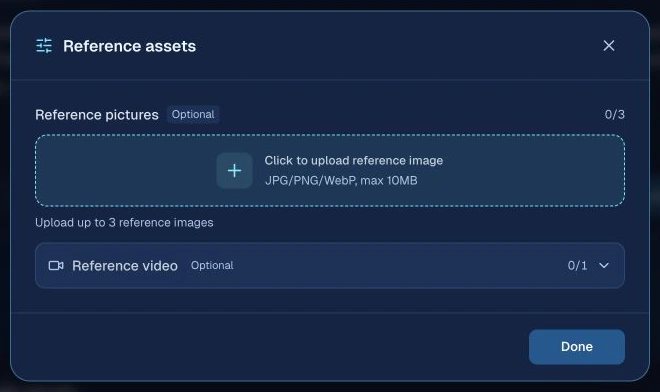
MakiVue's current approach
The project distinguishes independent shots, state inheritance, and strict continuity relationships. When there is no verifiable first/last frame handoff, it will not force frame matching based only on a broad “continuous” label; reference generation will also choose according to the current relationship.
Methods that can be used further
Maintain a “continuity record” scene by scene: character positions, clothing versions, prop ownership, physical condition, light sources, eyelines, entry and exit directions, and voice versions. When cutting between shots, carrying over appropriate ambient room tone can reduce the sense that the space has been reset; only switch the sound field when the scene truly changes.
Before moving to the next stepLook at the last frame of the previous shot and the first frame of the next shot side by side: why the character is there, and why they are holding that object, should both be explainable.
Image-to-video and text-to-video prompts: how should character action and camera movement be written?
“Cinematic, ultra HD, epic” cannot tell the model how the character should move. Image quality needs to be judged separately from composition, lighting, materials, and motion; higher resolution also cannot fix incorrect spatial relationships.
An image establishes a readable moment; a video description tells the changes that happen from that moment.
- 1
Look at the image first, then make the image move
Check the face, hands, number of props, spatial layers, and composition, and preserve the frame space needed for the key action. If the keyframe is wrong, fix the keyframe first; image-to-video will most likely inherit those errors as well.
- 2
Write the key motion first, then add details one by one
In image-to-video, the existing image already provides the subject and composition, so the prompt should focus on who moves, where they move, how the camera moves, and when it ends. Test the most critical action first, then add speed, environmental motion, and camera position; repeating long descriptions of appearance may conflict with the input image. Complex performance should first be broken into verifiable action stages.
- 3
Include sound in the review as well
Models that support native audio also need a clear speaker and turn order. When reviewing, check lip sync, pronunciation, ambient sound continuity, and dialogue clarity; after synthesis, confirm subtitle timing and overall volume as well.
| Input method | What the image is responsible for | Text focus |
|---|---|---|
| Text-to-video | There is no input image, so the frame must be defined first. | Character, location, composition, and lighting, then action and camera movement. |
| Image-to-video | In modes that use the first frame as input, determine the opening composition and visible state. | Subject motion, environmental motion, camera changes, and the end of the action. |
| Multi-reference generation | Provide identity, scene, or action references separately. | Explain the purpose of each reference; fill in the tag syntax according to the model requirements. |
| First/last frame control | Define the starting point and ending point; there should be a reasonable action path between the two images. | Explain how to get from the opening to the ending, rather than forcibly connecting incompatible poses. |
On narrow screens, scroll left and right to view the full table
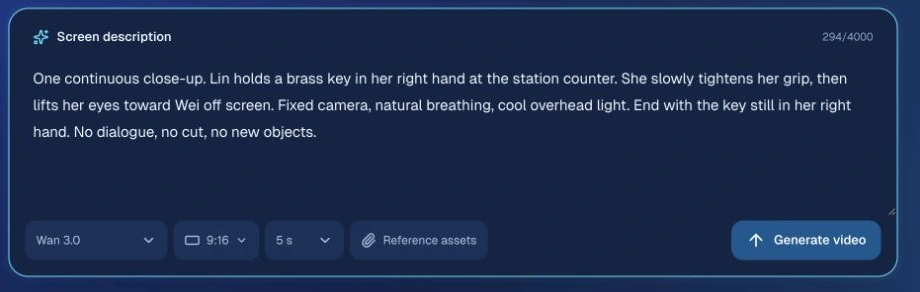
Keep the confirmed characters and the costumes for this scene. At the start of the shot, Lin is at the counter, already holding the brass key in her right hand.
She slowly tightens her fingers, then raises her eyes to look at Wei off screen. Fixed close shot, natural movement, preserve breathing and brief pauses.
Continue the station's cool overhead lighting without changing the light direction or exposure.
At the end of the shot, the key is still in her right hand, and she is already looking at Wei. No dialogue, no cut, no new props.
MakiVue's current approach
The project will handle references and duration according to the video model's capabilities; image and video prompts include constraints such as subject focus, composition, lighting, materials, action causality, and end-of-shot state, and avoid adding rain, fog, neon, or visual effects without basis.
Methods that can be used further
Choose several representative shots for comparison, keep the references, aspect ratio, and duration fixed, and change only one variable each time. Different models support negative prompts, reference tags, and camera movement terms differently; you can first express the goal with "fixed camera position" and "single continuous shot," then add constraints according to the official guide, rather than applying one universal prompt unchanged to every model.
Before moving to the next stepPlay it from beginning to end. The action result is clear, with no sudden changes, flicker, extra limbs, or unnecessary freeze frames; the dialogue is clearly audible.
If the AI video result is poor, which layer should you fix first?
Clicking generate again will only sample another result. An effective revision should first determine whether the problem comes from the story, prompt, reference, shot capacity, or model capability, and then narrow the scope of changes.
Keep the parts that have already passed, and give each failed item a specific, verifiable fix.
- 1
First distinguish content problems from runtime failures
Request failures, timeouts, and poor material quality are not the same kind of problem. For the first type, check the status and error message first; for the second, then inspect the instructions, references, and actual result. Do not treat every problem as if the prompt were simply not long enough.
- 2
Verify only one judgment per round
If you suspect action overload, split the action while keeping the identity and scene references unchanged; if the issue is lighting drift, unify the light source description. If you change the model, prompt, and references at the same time, you will not know which change was effective.
- 3
Check adjacent assets after revision
If a character changes clothes or what they are holding within one shot, the shot may look better on its own but still break the next shot. After replacing a keyframe, check the videos that depend on it; after rewriting upstream plot content, confirm which subsequent shots need to be updated accordingly.
| Symptom | Check first | Fix to try first |
|---|---|---|
| The plot repeats, and each episode starts over | Outline causality and the actual preceding content | Revise this episode's goal and outcome, and clarify the connection, rather than regenerating the video first. |
| Character face changes or costume jumps | Whether the identity reference conflicts with the current scene state | Clarify the role of each reference, use the confirmed version, and check the preceding and following frames. |
| The station gradually looks more and more like a different building | Whether the location description contains only style words | Add fixed anchor points, camera orientation, and spatial function. |
| Dialogue feels rushed, and actions are not completed | Duration and the density of actions and dialogue | Remove repeated information, split shots by natural phases, or adjust the duration. |
| Actions repeat between shots | The end of the previous shot and the opening of this shot | Cut in from the already completed state, and remove actions such as picking it up again or turning around again. |
| The image looks great, but the story is hard to understand | Shot purpose, viewing order, and reaction shots | Add the necessary establishing shots and informational reactions, and edit a previs first. |
On narrow screens, scroll left and right to view the full table
MakiVue's current approach
The workspace supports shot-by-shot editing and retries, and production checks can flag some structural issues; asynchronous tasks include status and failure information, making it easier to separate runtime errors from content revisions.
Methods that can be used further
Record the reason each shot failed and the final adopted version, and build up references and instructions that suit your subject matter. When multiple people are producing together, use the same acceptance standard to reduce back-and-forth caused by subjective feedback.
Before moving to the next stepBe able to state, "which variable I changed, and which problem I expect it to remove," before submitting the next round.
AI short drama production cost: how much does one finished minute cost, and how can you reduce rework?
There is no fixed price for one minute of AI short drama: models, generation settings, number of shots, and number of revision rounds all affect cost. First accept based on usable finished footage, then calculate the total investment; at the same time, watch the entire episode continuously and check the story, characters, pacing, sound, and subtitles.
Use the budget where it improves usable finished footage.
- 1
Do three viewing passes with different purposes
On the first pass, look only at story and pacing; on the second, inspect identity, space, and action handoffs shot by shot; on the third, wear headphones to check dialogue, ambient sound, and subtitles. Separate checks make specific problems easier to spot.
- 2
Prioritize errors that viewers will misunderstand
A prop suddenly switching hands, a line assigned to the wrong character, or a missing key reaction usually harms storytelling more than minor texture issues. Fix the hard errors that affect comprehension first, then optimize atmosphere and detail.
- 3
Record quality and investment at the same time
It is recommended to record the ratio of initially usable shots, the number of revision rounds, the final adopted duration, and the actual coin consumption. Cost per minute of usable finished footage = total relevant spending for this round ÷ final adopted minutes; counting only the price of successful requests will miss rework.
MakiVue's current approach
The project provides storyboard assets, progress, video compositing, and work publishing workflows. Before generation, you can view related model and fee information; actual charges and results are subject to task records and wallet records.
Methods that can be used further
First use still frames or lower-cost test footage to check the logic, and invest in formal settings only after confirmation. The budget should include discarded attempts and post-production time. For example: if the total spending for this round is 2,400 coins and the final adopted footage is 30 seconds, then the cost per minute of usable finished footage is 4,800 coins; this is only a calculation example, not a platform quote.
Before moving to the next stepHave someone who has not read the script watch it once: they should be able to explain who did what, why they did it, and what changed.
Publishing AI short videos: connect the opening, search, and retention
The viewing environment for short videos is different from that of complete live-action shorts. First let the audience understand what the character is facing, then use action and outcome to keep their attention. The title and cover should accurately promise the content, and the finished video is responsible for delivering it.
Use the data to find the step where viewers leave, then revise the corresponding creative decision.
- 1
Give the opening a visible problem
Midnight Lost and Found can begin with the engraved number on the key and Lin's paused hand, then establish the station background. Make another version that starts with the conflict between the two people, and compare whether viewers continue watching; do not treat "the first few seconds must include a twist" as a universal rule for all subjects.
- 2
Check visuals and text for each platform
Before posting to YouTube Shorts, Facebook Reels, or X, preview the aspect ratio, subtitles, and platform button occlusion on a phone. Make the title clearly state the plot theme or the problem solved by the tutorial, and keep episode numbers consistent in a series; use the description to add background and the entry point to the next episode. Related keywords only need to appear naturally; do not stuff tags or use trending words unrelated to the content.
- 3
Distinguish search clicks from viewing retention
YouTube search, thumbnail impressions, and the Shorts feed are different entry points. Stayed to watch reflects the share of viewers who continue watching after the first few seconds; average view duration and viewed percentage use their corresponding viewing metrics. Analyze them together with traffic sources and retention curves; play counts across platforms cannot be directly compared as if they used the same standard.
Shocking! The strongest AI masterpiece! You must watch until the end!
Story short: Midnight Lost and Found 01 | Why does the partner recognize the key left by the father? Production tutorial: Do AI short drama characters keep changing faces? Use character references and scene records to check these three issues.
| Observed signal | Check first | Change only one thing in the next round |
|---|---|---|
| At entry points with thumbnail impressions, click performance is weak | Whether the title and cover accurately explain the content. | Replace them with a clearer expression of the conflict or problem. |
| Clear drop-off at the opening in the feed | Whether you first placed a long intro, background exposition, or visuals that are hard to understand. | Move the key action earlier while keeping the necessary context. |
| Concentrated drop-off near dialogue or transitions | Whether information repeats, or volume, subtitles, space, or emotion disconnects. | Delete one repeated explanation or fix one transition. |
| Comments repeatedly ask, "Who is this person?" or "Why did the location change?" | Whether character identification and spatial establishment are insufficient. | Add identity clues or an establishing shot, then compare feedback. |
On narrow screens, scroll left and right to view the full table
MakiVue's current approach
MakiVue provides work, series, and publishing pages. Traffic and retention on external social platforms need to be checked in the corresponding platform backends, then the discovered issues should be brought back to the script, storyboard, or edit.
Methods that can be used further
Record the published version, runtime, opening, title, traffic sources, and observation window, and compare works of the same subject and similar length. When the sample is very small, accumulate observations first; do not infer algorithm preferences from a single fluctuation, and do not assume that "high retention" necessarily means you will get recommendations.
Before moving to the next stepThe finished video delivers on the title's promise; you can distinguish between "didn't click in" and "left after watching," and write down one specific improvement for the next version.
READY FOR YOUR FIRST SCENE?
Place this checklist before the Generate button.
It is recommended to first complete a test clip that can play coherently, then expand to the full episode. This checklist is for manual verification; checking items will not trigger generation, nor will it judge asset quality for you.
0 / 8 items checked
Continue checking the items that have not yet been confirmed.
Frequently Asked Questions About AI Short Drama Production
From beginner basics and character face changes to generation costs, once you find the answer, you can jump directly to the corresponding chapter to practice.
How can you use AI to turn a novel into a short drama or animated drama video?
First choose a novel excerpt suitable for a test shoot, list the character goals, conflicts, and must-keep events, then adapt it into scenes, actions, and dialogue. After confirming the script, generate character reference images, scene images, and storyboards, then generate video shot by shot and composite it. For longer novels, handle them by episode to avoid asking the model to complete all content at once.
View novel adaptation and script generationWhat is the difference between the production workflow for AI animated drama, motion comics, and realistic short drama?
The main workflow of outline, script, characters and scenes, storyboard, video, and sound can be shared. The differences are mainly in visual style and motion design: animated drama should first confirm the art style, character proportions, and linework, while realistic short drama pays more attention to faces, lighting, and natural performance. First use one scene to verify style and continuity, then produce the full episode.
Choose the production workflow that suits the storyHow can a beginner make AI short drama from scratch?
First define one protagonist, one goal, and one main setting, write the outline and short script, then create character references, storyboards, and one complete test clip. The test clip should be watchable continuously; after confirming the characters, actions, and sound, then expand to the full episode.
View the complete production workflowIf AI short drama characters keep changing faces, is fixing the seed useful?
Fixing the seed helps control randomness in some tools, but it does not guarantee the same identity across prompts, camera positions, or model versions. More important is using clear and mutually consistent character references, fixing identity traits, recording costumes and story state separately, and checking adjacent shots.
Check character consistencyFor image-to-video and text-to-video, which is better for continuous short drama?
When the character and composition are already confirmed, image-to-video is usually more convenient for creating around an established frame; when exploring new visuals, you can start with text generation. If you need multiple characters, first/last frame control, or reference actions, first verify the input methods supported by the model. The choice depends on the task of the shot, not on one mode always being better.
Compare the roles of inputs and promptsCan a three-view character sheet guarantee consistent AI video characters?
No, consistency cannot be guaranteed by a three-view sheet alone. Front, side, and back references must first be checked to confirm they are the same identity, and costumes and proportions must also match. Add the necessary angles based on the actual shots, input them according to the model's supported method, then compare the generated result with adjacent shots; clear and consistent references are more useful than stacking more images.
Prepare character settings and reference imagesHow should first/last frames be used in AI video so that two shots connect smoothly?
First determine whether the same action is being continued. When continuous action is needed, confirm the previous shot's ending pose, prop position, and action progress, then set the next shot's starting point; there must be a reasonable motion path between the two keyframes. When changing time or location, re-establish the space instead of forcing frame continuity. First/last frame input must be supported by the selected model.
View first/last frame transitions and cross-shot consistencyHow should AI storyboard prompts be written, and can a nine-panel grid generate video directly?
Clearly state the source event, shot purpose, characters and setting, opening state, main action, ending state, dialogue, and duration. A nine-panel grid is suitable for checking the overall shot plan; generally, you should select individual panels and confirm image quality before using them for single-shot generation. Only tools that explicitly support multi-panel input should process it according to their requirements.
Copy the storyboard prompt templateAre longer video prompts always better, and must they be in English?
The key is clarity without contradiction. For image-to-video, you can begin with only the necessary motion and add constraints one by one; choose the language according to the model's support and the content language. The screenshots here use English for ease of showing the interface, but that does not mean English works better for all models.
View video prompt examplesHow can dubbing, lip sync, and character voices stay consistent in AI short drama?
First determine each character's timbre, speaking speed, accent, and emotional range, and test both calm and intense dialogue. When using native audio, check for voice changes across shots; when using external dubbing, confirm dialogue duration first, then align lip sync and editing. Continue using appropriate ambient background sound, and confirm the licensing for the voices used.
Check sound and shot continuityHow much does it cost to make a one-minute AI short drama, and how can you reduce rework?
There is no single price. Cost depends on the model, settings, number of shots, and number of revision rounds. First make still frames or a small-scene test clip, then invest in formal generation; include discarded assets in total spending as well, then divide by the final adopted minutes to get the cost per minute of usable finished footage.
View cost calculation and acceptance methodsAn AI short video gets views but has low retention. What should you change?
First check whether the traffic comes from search, thumbnails, or the feed, then check where viewers drop off. For opening drop-off, inspect the content promise and information density; for mid-video drop-off, inspect repeated dialogue, sound, and transitions. Change only one key variable per round, and compare with works of similar subject matter, length, and observation window.
View publishing and data reviewApply This Guide to Your Next Project
References and Creator Practice
Further reading includes Reddit creator retrospectives, public Facebook tutorial text, YouTube video descriptions and chapters, long-form posts on X, and official documentation for models and platforms. Case studies can provide experimental ideas, but actual results still depend on subject matter, inputs, and models; below, each source is marked with the parts it is most useful for.
- Reddit · Creator reviewWhat I learned about character consistency while making a 12-Minute AI short film
A creator's full project review: reference image clarity, voice drift, blocking for multiple people, and making a test clip before formal generation. The success rates and costs in the article are that project's personal records.
- Facebook · Public tutorialSamuel Ayomide Adeniyan: Character Consistency with Flow
The public tutorial text introduces character setup, reusing identity descriptions, shot-by-shot production, and unified post-production sound and color grading. It is suitable for comparing with your own character preparation workflow.
- YouTube · Production tutorialAI Creator Tools:Seedance 2.5 Tutorial — AI Short Film With Consistent Characters
The video description and chapters provide a clear learning path: 02:21 character setup, 03:25 scenes, 04:12 storyboard, 07:54 editing, 09:02 sound effects. You can watch according to your current stage.
- X · Vendor practice articleInvideo:The Ultimate Handbook for AI Filmmaking
A vendor production article suitable for understanding how development, pre-production, production, and post-production connect, as well as how storyboard images, previs, and final shots fit together. Tool capabilities should be verified according to each product version.
- Runway · Official documentationImage to Video Prompting Guide
Check the roles of images and text in image-to-video generation, as well as subject action, environmental motion, camera movement, and time progression. This document is intended for Runway models; other models must be validated separately.
- YouTube · Official HelpUnderstand your YouTube content performance
Review the official definitions of traffic sources, Engaged views, Stayed to watch, and watch time to help distinguish between exposure, choosing to watch, and continued viewing.
- Google Search Central · Official GuideSearch Engine Optimization (SEO) Starter Guide
Refer to the recommendations for clear titles, unique summaries, descriptive links, image context, and helpful original content. Google does not use the keywords meta tag as a search signal.
Start with one shot that works.
First make one scene work, then copy the method to the entire project.
This guide is written based on MakiVue's current workflow and public materials. The capabilities of tools in external tutorials do not mean those capabilities are already integrated into MakiVue; reference methods, duration, and costs are subject to the actual page. Keep records of each round of inputs and results, and use test clips to judge whether the method suits your subject matter.
Back to Top ↑